
Apple’s latest parental controls are already available, and there is one detail families should check before looking for the new buttons: updating a child’s iPhone alone may not be enough. The revised Screen Time experience depends on the software used across the Family Sharing group.
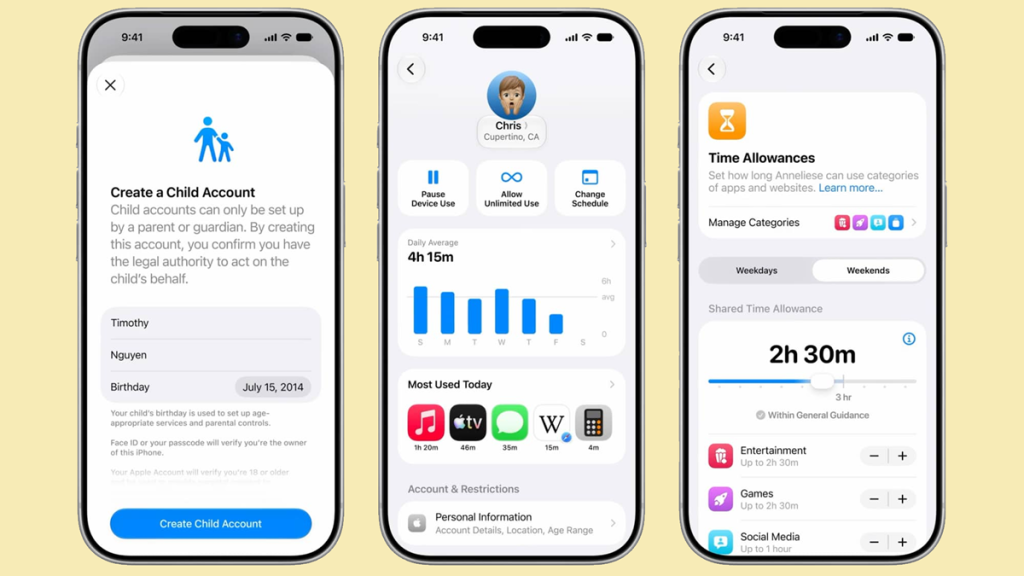
The September 14 release added Ask to Browse, broader Communication Safety protection and new Time Allowances with iOS 27, iPadOS 27 and macOS 27. As of September 19, these are released features, rather than promises for a later update. Availability still varies by device, language and region.
Website permission becomes part of the conversation
Ask to Browse gives parents a way to approve new websites their children want to visit. Apple’s child safety overview describes requests arriving in Messages, where a parent can review them before deciding. It extends the familiar idea of approving an app download to browsing in Safari.
That could be useful when a child follows a link from a classmate or discovers a new game website. It also creates a practical question for the family: who will handle those requests when the usual parent is unavailable? Agreeing on that beforehand is likely to be more useful than simply switching on every restriction.
Time limits have become more flexible
Time Allowances can cover a shared daily budget across categories such as games, entertainment and social media, with separate adjustments for individual categories. Apple also provides age-based guidance as a starting point, while leaving parents room to choose what suits their child.
Think of the difference between a quiet school evening and a long journey. A schedule that works for one may be awkward for the other. The value of these controls is the ability to revisit the arrangement, rather than treating the initial setup as a permanent family rule.
Communication Safety has also expanded beyond nudity to cover detected gore and violent material in supported images and videos, including live FaceTime calls. Apple announced that change alongside the redesigned Screen Time view, which makes usage and access controls easier to reach.
Check the family’s devices before changing settings
Apple’s updated parental controls documentation says every device in the Family Sharing group needs the relevant version 27 software. The organizer or a parent or guardian must then update the group’s parental controls. A child should have their own Apple Account within that group, and an approving adult needs to be in the child’s contacts.
An older device that cannot be updated does not mean the family has no controls left. Apple says parents can keep using the previous Screen Time experience or adjust controls directly on the child’s device. This is worth checking before assuming that a missing option is a fault.
Review the exceptions as well as the limits
Parents can allow a website in advance, which is useful for school resources. Approved and blocked sites can be reviewed later, and approval can be withdrawn. Support extends to Safari and other supported browsers; it should not be assumed to cover every browser automatically.
A sensible first pass is to check the sites needed for homework, confirm who receives requests and explain the changes to the child. That turns a software update into an arrangement everyone understands, with fewer surprises the next time a necessary page is blocked.