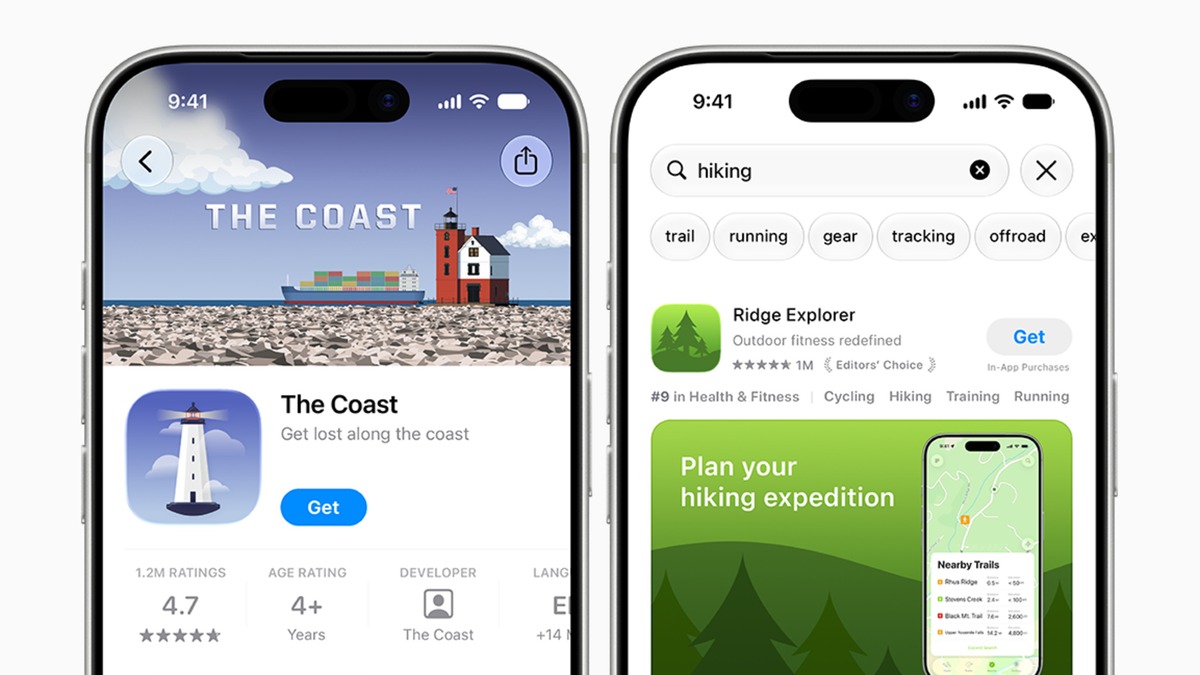
A screenshot shows you how an app works. A campaign image has a different job: making you stop and look. Apple’s new App Store creative assets give developers more room for that introduction, with image and video placements in product page headers and search results. The company announced the tools on October 5.
More room to introduce an app
Apple describes artwork for seasonal offers, new content and an app’s wider identity. These images and videos complement the existing screenshots and app previews. A game can highlight an event, while a travel app might give readers a sense of the trips it helps them plan.
The extra artwork is useful only if you read it alongside the rest of the listing. A mountain scene might catch your eye in a walking app. The route-planning screenshot tells you where the controls are. Check the description too, and read the dates if the image promotes an event.
Where App Store creative assets fit
Apple’s asset-management guide says the optional creative assets support images and videos for iOS 27 and iPadOS 27 or later. Developers can choose universal artwork for eligible placements or prepare separate assets. Product page headers, search results and in-app events are among the supported uses.
Preview the listing before submission
The new App Store Connect preview tool lets teams inspect artwork and metadata across devices, orientations and Dark Mode. It gives developers a chance to notice a poor crop or unreadable detail before the image reaches a store listing. A preview still needs someone to examine it carefully.
Preparing the listing is separate from adapting the software to new hardware. Our report on iPhone Duo apps and fold controls looks at the changes inside an app. Store artwork and a useful fold-aware layout each need their own attention.
Artwork can be ready ahead of a campaign
Asset Library brings creative artwork, screenshots and app previews together in App Store Connect. Teams can submit creative assets independently of an app version, allowing them to get artwork approved before they need it. For a version already live, Apple also describes publishing approved artwork changes without submitting a new app version.
For a small team, this should make an ordinary production job easier. A seasonal campaign may need several versions of an image. Keeping them together saves looking through separate folders, but it does not decide which file belongs in a particular placement. Clear names and a final crop check remain useful.
Keep looking after the header catches your eye
If you need a particular feature, find it in the screenshots and description. Recent reviews can help you spot a practical problem the campaign artwork does not explain. A richer visual introduction can be helpful without being the reason you choose the app.
Apple has made the tools available to developers now. Because the creative assets are optional, listings will adopt them at different speeds. The company’s original announcement explains the update, while its App Store Connect guide covers handling and approval. Neither promises an immediate change to every app page.